Sunday, 28 December 2014

Difference Between DataReader, DataSet, DataAdapter and DataTable in C#

DataReader
DataReader is used to read the data from database and it is a read and forward only connection oriented architecture during fetch the data from database. DataReader will fetch the data very fast when compared with dataset. Generally we will use ExecuteReader object to bind data to datareader.
To bind DataReader data to GridView we need to write the code like as shown below:
Protected void BindGridview()
{
using (SqlConnection conn = new SqlConnection("Data Source=abc;Integrated Security=true;Initial Catalog=Test"))
{
con.Open();
SqlCommand cmd = new SqlCommand("Select UserName, First Name,LastName,Location FROM Users", conn);
SqlDataReader sdr = cmd.ExecuteReader();
gvUserInfo.DataSource = sdr;
gvUserInfo.DataBind();
conn.Close();
}
}
  • Holds the connection open until you are finished (don't forget to close it!).
  • Can typically only be iterated over once
  • Is not as useful for updating back to the database
DataSet
DataSet is a disconnected orient architecture that means there is no need of active connections during work with datasets and it is a collection of DataTables and relations between tables. It is used to hold multiple tables with data. You can select data form tables, create views based on table and ask child rows over relations. Also DataSet provides you with rich features like saving data as XML and loading XML data.
protected void BindGridview()
{
    SqlConnection conn = new SqlConnection("Data Source=abc;Integrated Security=true;Initial Catalog=Test");
    conn.Open();
    SqlCommand cmd = new SqlCommand("Select UserName, First Name,LastName,Location FROM Users", conn);
    SqlDataAdapter sda = new SqlDataAdapter(cmd);
    DataSet ds = new DataSet();
    da.Fill(ds);
    gvUserInfo.DataSource = ds;
    gvUserInfo.DataBind();
}
DataAdapter
DataAdapter will acts as a Bridge between DataSet and database. This dataadapter object is used to read the data from database and bind that data to dataset. Dataadapter is a disconnected oriented architecture. Check below sample code to see how to use DataAdapter in code:
protected void BindGridview()
{
    SqlConnection con = new SqlConnection("Data Source=abc;Integrated Security=true;Initial Catalog=Test");
    conn.Open();
    SqlCommand cmd = new SqlCommand("Select UserName, First Name,LastName,Location FROM Users", conn);
    SqlDataAdapter sda = new SqlDataAdapter(cmd);
    DataSet ds = new DataSet();
    da.Fill(ds);
    gvUserInfo.DataSource = ds;
    gvUserInfo.DataBind();
}
  • Lets you close the connection as soon it's done loading data, and may even close it for you automatically
  • All of the results are available in memory
  • You can iterate over it as many times as you need, or even look up a specific record by index
  • Has some built-in faculties for updating back to the database.
DataTable 
DataTable represents a single table in the database. It has rows and columns. There is no much difference between dataset and datatable, dataset is simply the collection of datatables.

protected void BindGridview()
{
     SqlConnection con = new SqlConnection("Data Source=abc;Integrated Security=true;Initial Catalog=Test");
     conn.Open();
     SqlCommand cmd = new SqlCommand("Select UserName, First Name,LastName,Location FROM Users", conn);
     SqlDataAdapter sda = new SqlDataAdapter(cmd);
     DataTable dt = new DataTable();
     da.Fill(dt);
     gridview1.DataSource = dt;
     gvidview1.DataBind();
}


DataReader
===========
DataReader is like a forward only recordset. It fetches one row at a time so very less network cost compare to DataSet(Fethces all the rows at a time). DataReader is readonly so we can't do any transaction on them. DataReader will be the best choice where we need to show the data to the user which requires no transaction. As DataReader is forward only so we can't fetch data randomly. .NET Data Providers optimizes the datareader to handle huge amount of data.

DataSet
=======
DataSet is an in memory representation of a collection of Database objects including tables of a relational database schemas.
DataSet is always a bulky object that requires a lot of memory space compare to DataReader. We can say that the DataSet is a small database because it stores the schema and data in the application memory area. DataSet fetches all data from the datasource at a time to its memory area. So we can traverse through the object to get the required data like querying database.

Group by clause and Having clause In Sql Server

group by clause:-                                                                                                                                    
When we run aggregated function in select query,we get the output on the basis of all the records but if we want to use aggregated function,then we should give us output on the basis of group and column and we can used 'group by clause' before  grouping the records.If we want to keep some conditions,we can specify 'where'clause and after grouping the records if we want to some conditions then we can use 'having' clause.
There are some commands to explain the group by clause. which are given below:
1. ) First create a students table as shown below:


2. )  Use group by command as given below:
  
   select deptName,count(*) from students where salary>1000
   group by deptName
Output:-

3. ) Use group by and Having clause as given below:-

     select deptName,count(*) from students 
    group by deptName
    having COUNT(*)>1
 Output:-

4. ) Use group by , where clause and having clause as given below:-

      select deptName,count(*)as Total from students where salary >=300
      group by deptName
      having COUNT(*)>1
Output:-

What is a Trigger

What is a Trigger
A trigger is a special kind of a store procedure that executes in response to certain action
 on the table like insertion, deletion or updation of data. It is a database object which is bound 
to a table and is executed automatically. You can’t explicitly invoke triggers. The only way to 
do this
 is by performing the required action no the table that they are assigned to.
Types Of Triggers
There are three action query types that you use in SQL which are INSERT, UPDATE and DELETE. So, 
there 
are three types of triggers and hybrids that come from mixing and matching the events and timings
 that fire them.

Basically, triggers are classified into two main types:-

(i) After Triggers (For Triggers)
(ii) Instead Of Triggers 

(i) After Triggers
These triggers run after an insert, update or delete on a table. They are not supported for views.
AFTER TRIGGERS can be classified further into three types as:

(a) AFTER INSERT Trigger.
(b) AFTER UPDATE Trigger.
(c) AFTER DELETE Trigger.

Let’s create After triggers. First of all, let’s create a table and insert some sample data. Then,
 on this table, 
I will be attaching several triggers.

Collapse | Copy Code

CREATE TABLE Employee_Test
(
Emp_ID INT Identity,
Emp_name Varchar(100),
Emp_Sal Decimal (10,2)
)

INSERT INTO Employee_Test VALUES ('Anees',1000);
INSERT INTO Employee_Test VALUES ('Rick',1200);
INSERT INTO Employee_Test VALUES ('John',1100);
INSERT INTO Employee_Test VALUES ('Stephen',1300);
INSERT INTO Employee_Test VALUES ('Maria',1400);


I will be creating an AFTER INSERT TRIGGER which will insert the rows inserted into the table into
another audit table. 
The main purpose of this audit table is to record the changes in the main table. This can be thought
of as a generic audit
 trigger.

Now, create the audit table as:-
Collapse | Copy Code

CREATE TABLE Employee_Test_Audit
(
Emp_ID int,
Emp_name varchar(100),
Emp_Sal decimal (10,2),
Audit_Action varchar(100),
Audit_Timestamp datetime
)

(a) AFTRE INSERT Trigger
This trigger is fired after an INSERT on the table. Let’s create the trigger as:-
Collapse | Copy Code

CREATE TRIGGER trgAfterInsert ON [dbo].[Employee_Test] 
FOR INSERT
AS
    declare @empid int;
    declare @empname varchar(100);
    declare @empsal decimal(10,2);
    declare @audit_action varchar(100);

    select @empid=i.Emp_ID from inserted i;    
    select @empname=i.Emp_Name from inserted i;    
    select @empsal=i.Emp_Sal from inserted i;    
    set @audit_action='Inserted Record -- After Insert Trigger.';

    insert into Employee_Test_Audit
           (Emp_ID,Emp_Name,Emp_Sal,Audit_Action,Audit_Timestamp) 
    values(@empid,@empname,@empsal,@audit_action,getdate());

    PRINT 'AFTER INSERT trigger fired.'
GO

The CREATE TRIGGER statement is used to create the trigger. THE ON clause specifies
 the table name on which the trigger is to be attached.
 The FOR INSERT specifies that this is an AFTER INSERT trigger. In place of FOR 
INSERT, AFTER INSERT can be used. Both of them mean the same.
In the trigger body, table named inserted has been used. This table is a logical
 table and contains the row that has been inserted. I have selected the fields from
 the logical inserted table from the row that has been inserted into different variables,
 and finally inserted those values into the Audit table.
To see the newly created trigger in action, lets insert a row into the main table as :
Collapse | Copy Code

 insert into Employee_Test values('Chris',1500);


Now, a record has been inserted into the Employee_Test table. The AFTER INSERT trigger attached 
to this table has
 inserted the record into the Employee_Test_Audit as:-
Collapse | Copy Code

6   Chris  1500.00   Inserted Record -- After Insert Trigger.    2008-04-26 12:00:55.700

(b) AFTER UPDATE Trigger
This trigger is fired after an update on the table. Let’s create the trigger as:-
Collapse | Copy Code

CREATE TRIGGER trgAfterUpdate ON [dbo].[Employee_Test] 
FOR UPDATE
AS
    declare @empid int;
    declare @empname varchar(100);
    declare @empsal decimal(10,2);
    declare @audit_action varchar(100);

    select @empid=i.Emp_ID from inserted i;    
    select @empname=i.Emp_Name from inserted i;    
    select @empsal=i.Emp_Sal from inserted i;    
    
    if update(Emp_Name)
        set @audit_action='Updated Record -- After Update Trigger.';
    if update(Emp_Sal)
        set @audit_action='Updated Record -- After Update Trigger.';

    insert into Employee_Test_Audit(Emp_ID,Emp_Name,Emp_Sal,Audit_Action,Audit_Timestamp) 
    values(@empid,@empname,@empsal,@audit_action,getdate());

    PRINT 'AFTER UPDATE Trigger fired.'
GO

The AFTER UPDATE Trigger is created in which the updated record is inserted into the audit table.
 There is no logical
 table updated like the logical table inserted. We can obtain the updated value of a field from
 the update(column_name) function. In our trigger, we have used, if update(Emp_Name) to check if
 the column Emp_Name has been updated. We have similarly checked the column Emp_Sal for an update.
Let’s update a record column and see what happens.
Collapse | Copy Code

 update Employee_Test set Emp_Sal=1550 where Emp_ID=6

This inserts the row into the audit table as:-
Collapse | Copy Code

6  Chris  1550.00  Updated Record -- After Update Trigger.      2008-04-26 12:38:11.843 

(c) AFTER DELETE Trigger
This trigger is fired after a delete on the table. Let’s create the trigger as:-
Collapse | Copy Code

CREATE TRIGGER trgAfterDelete ON [dbo].[Employee_Test] 
AFTER DELETE
AS
    declare @empid int;
    declare @empname varchar(100);
    declare @empsal decimal(10,2);
    declare @audit_action varchar(100);

    select @empid=d.Emp_ID from deleted d;    
    select @empname=d.Emp_Name from deleted d;    
    select @empsal=d.Emp_Sal from deleted d;    
    set @audit_action='Deleted -- After Delete Trigger.';

    insert into Employee_Test_Audit
(Emp_ID,Emp_Name,Emp_Sal,Audit_Action,Audit_Timestamp) 
    values(@empid,@empname,@empsal,@audit_action,getdate());

    PRINT 'AFTER DELETE TRIGGER fired.'
GO

In this trigger, the deleted record’s data is picked from the logical deleted table and inserted 
into the audit table.
Let’s fire a delete on the main table.
A record has been inserted into the audit table as:-
Collapse | Copy Code

 6  Chris    1550.00  Deleted -- After Delete Trigger.  2008-04-26 12:52:13.867 

All the triggers can be enabled/disabled on the table using the statement
Collapse | Copy Code

ALTER TABLE Employee_Test {ENABLE|DISBALE} TRIGGER ALL 

Specific Triggers can be enabled or disabled as :-
Collapse | Copy Code

ALTER TABLE Employee_Test DISABLE TRIGGER trgAfterDelete


This disables the After Delete Trigger named trgAfterDelete on the specified table.

(ii) Instead Of Triggers
These can be used as an interceptor for anything that anyonr tried to do on our table or view.
 If you define 
an Instead Of trigger on a table for the Delete operation, they try to delete rows, and they will
 not actually
 get deleted (unless you issue another delete instruction from within the trigger)
INSTEAD OF TRIGGERS can be classified further into three types as:-

(a) INSTEAD OF INSERT Trigger.
(b) INSTEAD OF UPDATE Trigger.
(c) INSTEAD OF DELETE Trigger.

(a) Let’s create an Instead Of Delete Trigger as:-
Collapse | Copy Code

CREATE TRIGGER trgInsteadOfDelete ON [dbo].[Employee_Test] 
INSTEAD OF DELETE
AS
    declare @emp_id int;
    declare @emp_name varchar(100);
    declare @emp_sal int;
    
    select @emp_id=d.Emp_ID from deleted d;
    select @emp_name=d.Emp_Name from deleted d;
    select @emp_sal=d.Emp_Sal from deleted d;

    BEGIN
        if(@emp_sal>1200)
        begin
            RAISERROR('Cannot delete where salary > 1200',16,1);
            ROLLBACK;
        end
        else
        begin
            delete from Employee_Test where Emp_ID=@emp_id;
            COMMIT;
            insert into Employee_Test_Audit(Emp_ID,Emp_Name,Emp_Sal,Audit_Action,Audit_Timestamp)
            values(@emp_id,@emp_name,@emp_sal,'Deleted -- Instead Of Delete Trigger.',getdate());
            PRINT 'Record Deleted -- Instead Of Delete Trigger.'
        end
    END
GO

This trigger will prevent the deletion of records from the table where Emp_Sal > 1200. 
If such a record is deleted, 
the Instead Of Trigger will rollback the transaction, otherwise the transaction will be committed.
Now, let’s try to delete a record with the Emp_Sal >1200 as:-

Collapse | Copy Code

delete from Employee_Test where Emp_ID=4

This will print an error message as defined in the RAISE ERROR statement as:-

Collapse | Copy Code

Server: Msg 50000, Level 16, State 1, Procedure trgInsteadOfDelete, Line 15
Cannot delete where salary > 1200 


And this record will not be deleted.
In a similar way, you can code Instead of Insert and Instead Of Update triggers on your tables.

Indexes in SQL Server

One of the important parts of SQL Server development and optimization is the creation of indexes. In order to create proper indexing strategies it is necessary to understand how indexes work. This tutorial will guide you step by step to understand some index basics.
There are only two different types of indexes. Clustered and NonClustered. There can only be one clustered index on a table and the reason is simple:
  • A Clustered index is the data of table sorted according to the columns you choose.
  • A NonClustered index is just like the index of a book. It contains data sorted so that it’s easy to find, then once found, it points back to the actual page that contains the data. (In other words, it points back to the clustered index)
Suppose we are reading a book about biographical information of all the U.S. Presidents, and the book itself orders the biographies starting from the first president to the latest president. This ordering of the pages would represent the clustered index.
Now suppose you asked two different people to find Franklin D. Roosevelt’s biography. Person-A was a historian and Person-B was unschooled. Person-A would quickly be able to find the presidents biography while Person-B would have to scan through each page in order to find the biography. Even if the Person-B used the book’s index (akin to the non-clustered index), he would still have to search for the page after he found the page number.
So it is always faster to find information off of the clustered index because the data in already at the “leaf-level” off the index.
The clustered index should be a key that does not get modified. It should also ideally be sequential so that the underlying data pages do not become fragmented [more information]
With this information, how do we determine what the clustered index should be? Well, it depends on the population of the people searching for the biographies. If it is mostly unschooled people, then it would be more efficient to sort the book alphabetically rather than the historical order of the presidents.
Now let’s say that 75% of the population are historians and the other 25% are unschooled. Let’s assume the data the historians will need consists of a lot of different information regarding the president’s biographies, while all the unschooled need is the president’s age at the time they took office. In this scenario, it is more plausible to keep the ordering of the book (or the clustered index) based on the order of the president, then simply add the age of the president in the back index of the book (the non clustered index). That way the unschooled people do not have to look into the front of the book (clustered index) for the president’s age. They could simply find it in the back of the book by doing one single lookup. The presidents age being stored in the rear index would be considered at the “leaf” level. This would satisfy both requirements and would be efficient for both historians and the unschooled group.
First let’s create our president’s table download and run: PresidentsTable
After running, let’s turn on the execution plan (In SQL Server Managment Studio place your mouse in the query window and select Query -> Include Actual Execution Plan)
Now execute the following query:
SELECT
    PresidentNumber
    ,President
    ,YearsInOffice
    ,YearFirstInaugurated
FROM Presidents
WHERE PresidentNumber = 32
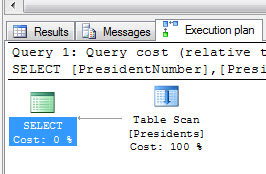
Now let’s view the execution plan:
tablescanexecutionplan
Without a clustered index, our book is in no particular order. To find president 32, we need to scan every page.
Now let’s add a clustered index so we can organize our book according to PresidentNumber:
CREATE UNIQUE CLUSTERED INDEX IDX_C_Presidents_PresidentNumber ON Presidents(PresidentNumber)
And let’s run our query again:
SELECT
    PresidentNumber
    ,President
    ,YearsInOffice
    ,YearFirstInaugurated
FROM Presidents
WHERE PresidentNumber = 32
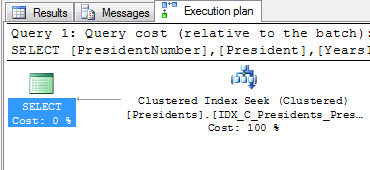
tableseekexecutionplan
Our execution plan now shows a “clustered index seek”. Meaning we did not have to look through every page of our book. We jumped right to page 32 and found the information on our president there.
In summary, when we look up information based on the clustered index (the way the table is physically sorted), we naturally find all the information we are looking for already there (President, YearsInOffice, YearFirstInaugurated).
Now, let’s create a non clustered index and look up the YearFirstInaugurated by president’s name:
CREATE NONCLUSTERED INDEX IDX_NC_Presidents_President ON Presidents(President)
Now let’s run our query to find the YearFirstInaugurated:
-- Force our query to use the index
-- (table is so small SQL Server bypasses it)
SELECT
    YearFirstInaugurated
FROM Presidents WITH(INDEX(IDX_NC_Presidents_President))
WHERE President = 'Franklin Roosevelt'
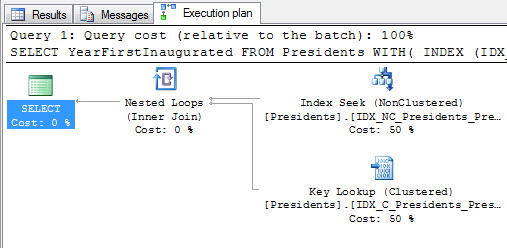
If we look at our execution plan now, we will see that we initially looked the president’s name up in our index, then after finding the page where the presidents biography was located, we went to that page to grab the YearFirstInaugurated. This is denoted by the “Key Lookup”. (Also known as “Bookmark Lookup”)
bookmarklookup
This is a more expensive operation because our data is not at the “leaf-level” (or inline with the index we just searched), rather it is in the clustered index instead.
So how do we fix this? In SQL Server 2005, a new feature was introduced called “included columns”. This allows us to include data at the leaf-level of an index. So rather than looking up YearFirstInaugurated in the clustered index, we can find it in the nonclustered index. Let’s drop our index and include YearFirstInagurated in our nonclustered index:
DROP INDEX Presidents.IDX_NC_Presidents_President
GO
CREATE NONCLUSTERED INDEX IDX_NC_Presidents_President ON Presidents(President) INCLUDE(YearFirstInaugurated)
And run our query one more time:
-- Force our query to use the index
-- (table is so small SQL Server bypasses it)
SELECT
    YearFirstInaugurated
FROM Presidents WITH(INDEX(IDX_NC_Presidents_President))
WHERE President = 'Franklin Roosevelt'
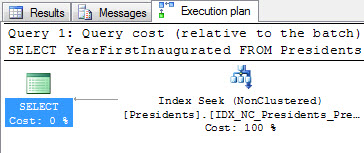
Now we only have an index seek. Because as soon as we looked the president up in the index, we immediately also found the YearFirstInaugurated:
indexseek